
When Trusted Applications Become Risky: The Notepad++ Update Hijacking Incident
The Notepad++ incident shows how trusted software can become dangerous when attackers compromise the update delivery chain instead of the application itself.

Trusted applications are supposed to make life easier. You download them, install updates, and move on. But when attackers compromise the software delivery chain, even a familiar tool can become a vehicle for malicious activity.
That is exactly why the recent Notepad++ incident matters.
Notepad++ is one of the most widely used text and code editors on Windows. It has been trusted by developers, system administrators, and everyday users for years. In this case, however, the issue was not that the application itself was rewritten as malware. Instead, in a highly targeted supply chain attack, threat actors abused its update delivery path to serve malicious files to selected victims.
The lesson is bigger than one application: security risks do not always begin with obviously suspicious downloads. Sometimes they arrive disguised as legitimate updates.
What Happened to Notepad++?
In early 2026, the Notepad++ project disclosed that attackers had hijacked part of its update delivery chain during 2025. According to the project’s published incident update, the compromise began in June 2025 and continued until December 2, 2025.
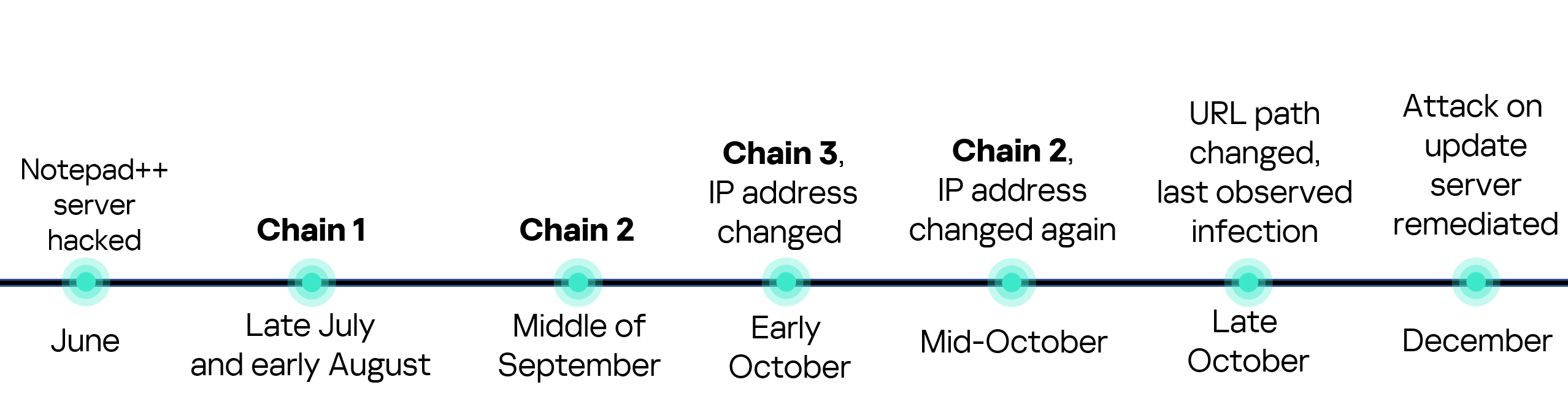
Importantly, this was described as a selective operation, not a broad mass-distribution malware campaign. Only certain targeted users appear to have been affected by the malicious update flow.
The key point is this: the attackers did not need to tamper with the Notepad++ source code itself. According to the published explanation, the compromise occurred at the former hosting provider level. This allowed malicious actors to intercept and redirect update traffic intended for notepad-plus-plus.org, serving malicious update manifests to selected targets.
In plain English: the application itself remained legitimate, but the route used to deliver updates became dangerous.
That makes this a classic software supply chain problem. Users trust the application. The application trusts its updater. The updater trusts the delivery path. If attackers can compromise that chain at the right point, they can abuse that trust far more effectively than with an ordinary phishing attachment or fake installer.
Why This Matters Beyond Notepad++
The Notepad++ incident is a sharp reminder that risky software behavior does not always come from cracked programs, pirated installers, or obviously shady downloads. Sometimes the threat enters through a normal update workflow users rely on every day.
Software updaters are often treated as inherently safe. In reality, if the hosting layer, redirection logic, or download verification process is compromised, the updater itself can become the attack vector. That means a legitimate application can temporarily become a delivery mechanism for malicious payloads without users realizing anything is wrong.
For businesses, this is especially serious. A compromised application on one workstation can become an entry point into a wider network. For individual users, it can lead to credential theft, surveillance, persistence mechanisms, or silent backdoor access.
How the Attack Worked
Based on the public incident summary and external technical reporting, attackers redirected some Notepad++ update traffic to infrastructure under their control. From there, malicious executables could be delivered in place of legitimate updates for selected victims.
External analysis also reported multiple infection chains involving staged malware delivery, system reconnaissance, and second-stage payload execution. In some observed cases, malicious payloads such as update.exe were launched by the legitimate updater process GUP.exe, making the activity appear more trustworthy at first glance.
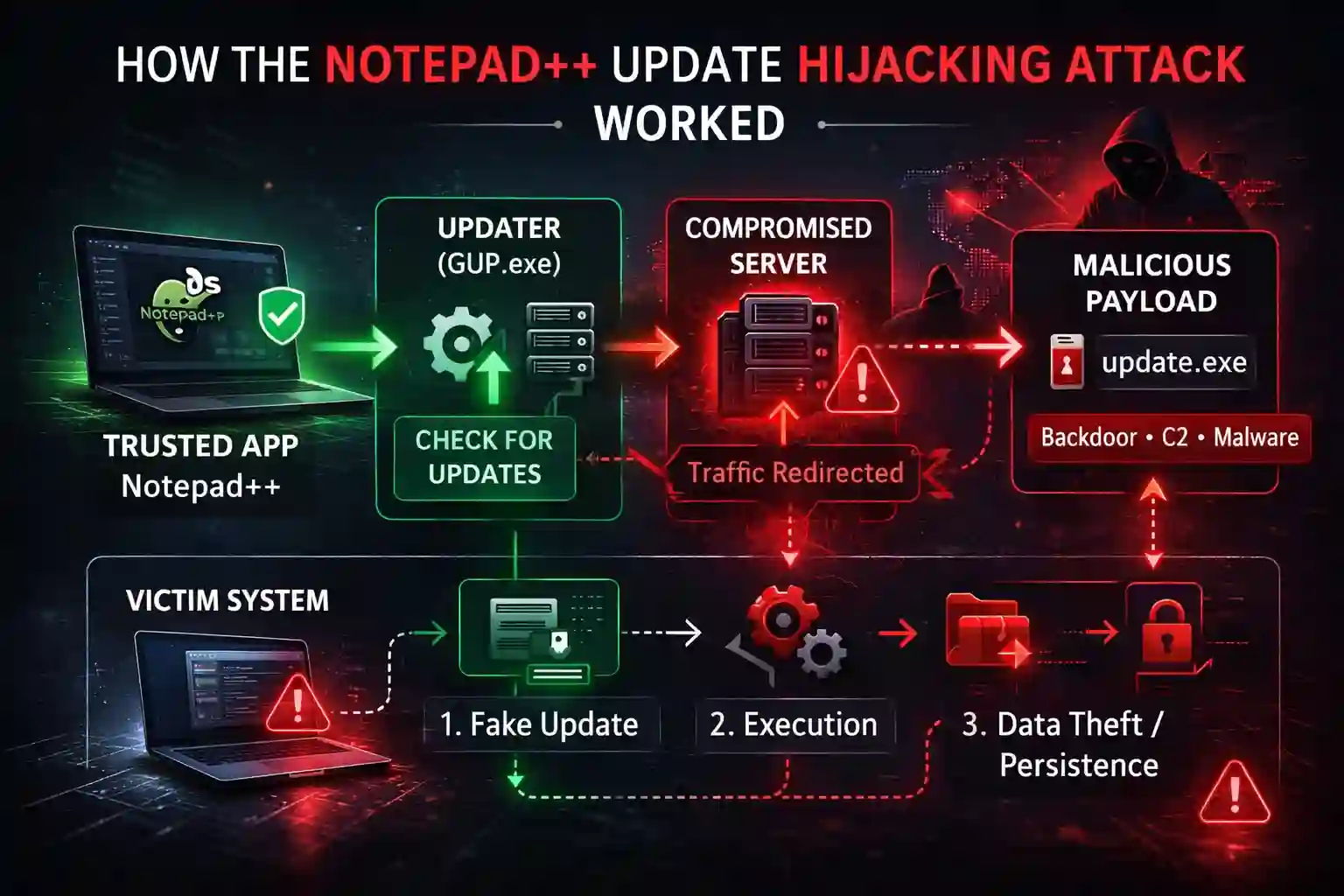
That is what makes supply chain attacks so effective: the malicious activity can hide behind legitimate software behavior. No obviously fake installer. No sketchy browser toolbar. Just a poisoned update delivered through a trusted path.
Was Notepad++ Itself Malware?
No — not in the literal sense.
The available information indicates that the main issue was the compromise of update-related infrastructure, combined with insufficient verification controls in older updater flows. There is no indication that the Notepad++ codebase itself was turned into malware.
That distinction matters. The software remained legitimate; the distribution path was what became unsafe.
From an end-user perspective, however, the result can feel very similar: even trusted software can expose users to malicious code if its supply chain is compromised. That is why relying only on brand trust is not enough. Reputable software is safer, yes — but it is not immune to infrastructure-level attacks.
Which Versions Were Affected?
Public guidance from the project recommended that users manually update to Notepad++ v8.9.1 because it included important security improvements. Older versions were more exposed because they relied on weaker update verification controls.
That does not mean every installation below v8.9.1 was infected. The campaign was described as selective. However, any system that used the updater during the compromise window deserved closer review.
Signs an Application May Be Compromised
Whether the software is Notepad++ or another desktop application, suspicious behavior after an update can be a warning sign. Common indicators include:
- Unexpected outbound network connections after an update
- New background processes you do not recognize
- Security alerts involving temporary folders or update executables
- Unusual CPU, disk, or network activity
- New autoruns, services, or startup entries appearing after a software update
- Antivirus or EDR detections tied to normally trusted application paths
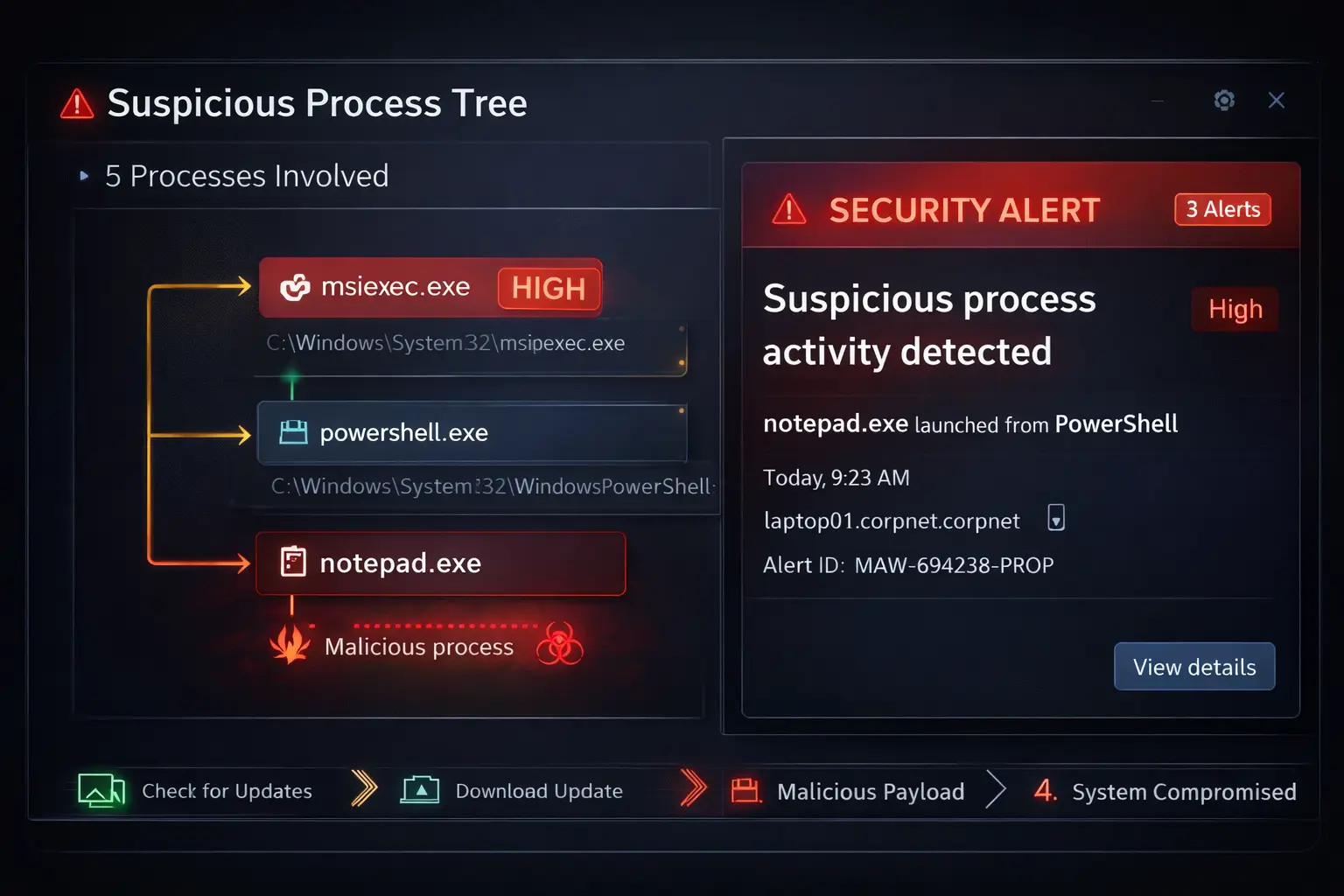
In the Notepad++ case, defenders were encouraged to review update-related activity and investigate suspicious artifacts linked to updater behavior. Endpoint monitoring and network telemetry were especially important in identifying signs of compromise.
How to Protect Yourself
1. Do Not Blindly Trust Auto-Updates
Automatic updates are usually beneficial, but they should not be treated as beyond question. If a vendor discloses an incident, follow the official remediation guidance immediately.
2. Prefer Direct, Verified Downloads
If an updater is under suspicion, download the latest installer manually from the vendor’s official site and verify signatures whenever possible.
3. Monitor Update Activity
Endpoint protection, EDR, and network monitoring can help detect suspicious child processes, persistence mechanisms, or outbound connections triggered by malicious updates.
4. Audit High-Trust Applications
Text editors, browsers, remote access tools, password managers, and developer utilities are highly trusted on most systems. That makes them attractive targets for supply chain abuse.
5. Treat Trusted Software as a Potential Entry Point
A well-known application does not automatically guarantee a safe update path. If the infrastructure behind software delivery is compromised, an attacker can weaponize that trust.
What Businesses Should Learn from This
The biggest lesson is simple: software trust is layered, and every layer can fail.
Approving a reputable application is only one part of the risk model. Organizations also need to consider:
- how updates are delivered
- how downloads are verified
- how endpoints are monitored after updates
- how quickly teams can respond to vendor-side incidents
The Notepad++ case is a strong example of why vendor reputation alone is not enough. Security depends not just on trusted software, but on trusted delivery, trusted verification, and trusted operational controls.